Help centreRecords
Use your To do list
Everything that needs you, most urgent first: deadlines, expiring documents and next steps.
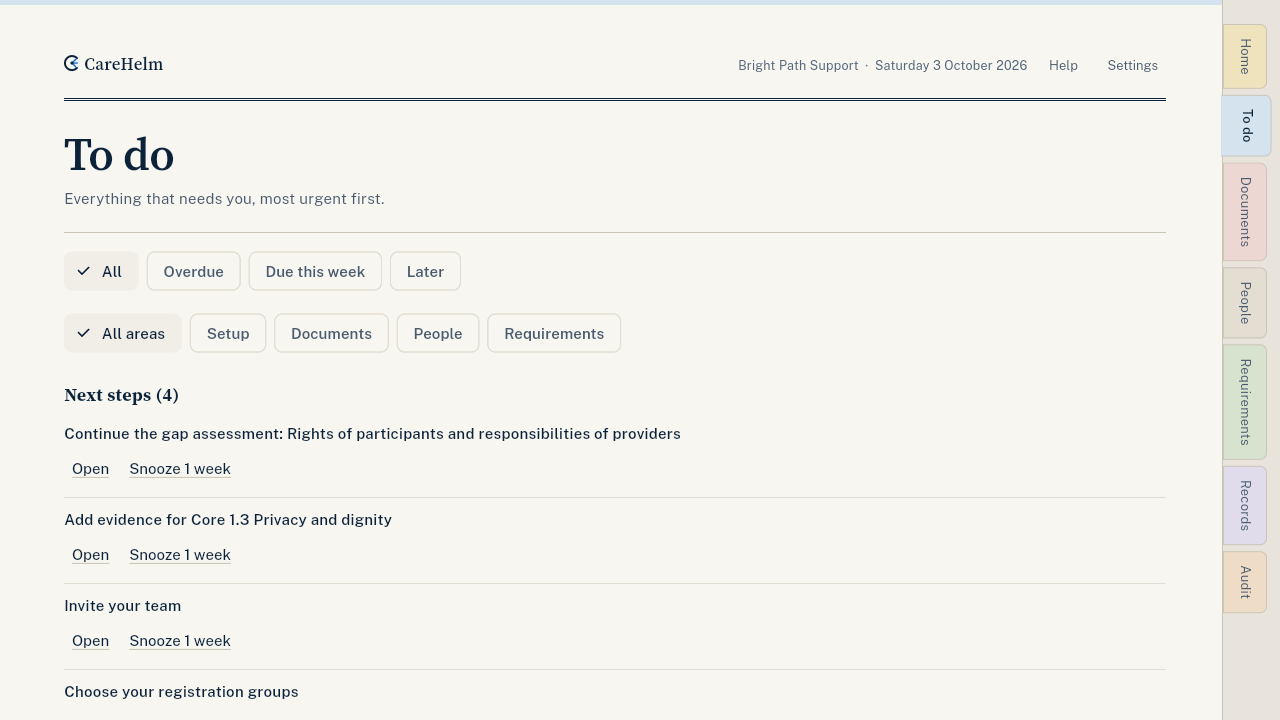
To do collects every task across CareHelm: incident deadlines, documents about to expire, policy reviews, complaints to acknowledge and your getting-started steps. The most urgent come first.
Steps
- Open To do. The tab shows how many items are on the list.
- Read the groups: Now, This week, To check, Next steps and Later.
- Each item names the record it is about, such as a worker, a document or a participant ID. Press Open to go to that record.
- An item leaves the list when its record is finished. Press Snooze 1 week to move it, or Hide reminder to take a reminder off the list.
- Use the filters to show only overdue items, items due this week, or one area.
Good to know
- Home shows the most urgent item as Your next step.
- Monthly check-in gives you a short list of things to look at each month.
- When the NDIS rules change, Rules changed lists what to update.